
A revolutionary way to design and build websites thanks to our new Design System, Layout LIbrary, Visual Editor and Visual Page Builder. Find out more and start building websites more efficiently to the highest standard every time.
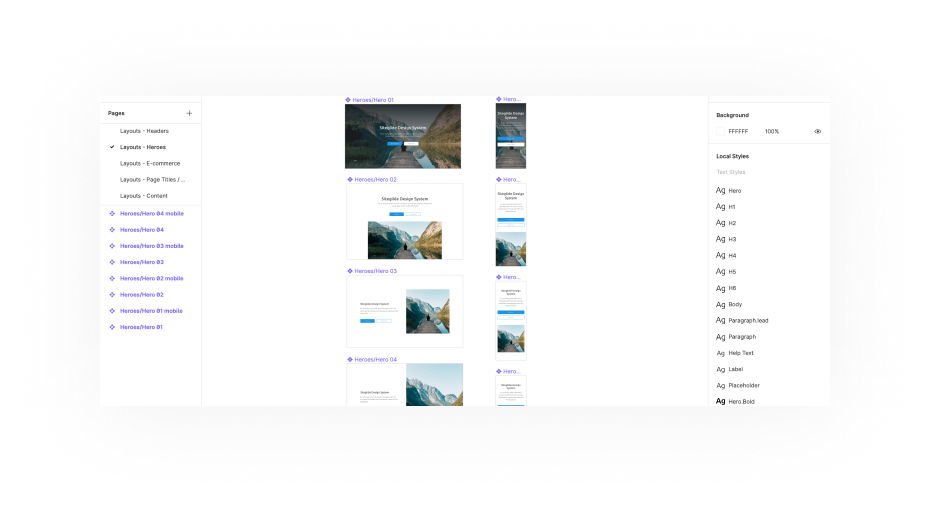
Many agencies are used to using Templates/Themes to speed up the development flow but often this causes problems/issues, devalues the service and leads to bad practice. We believe in Frameworks and following Best Practice standards. As a result we have created the Siteglide Design System which offers a Framework to deliver quality solutions to clients every time and with hugely increased efficiency.
“A design system is a collection of reusable components, guided by clear standards, that can be assembled together to build any number of applications.” - Invisionapp.com
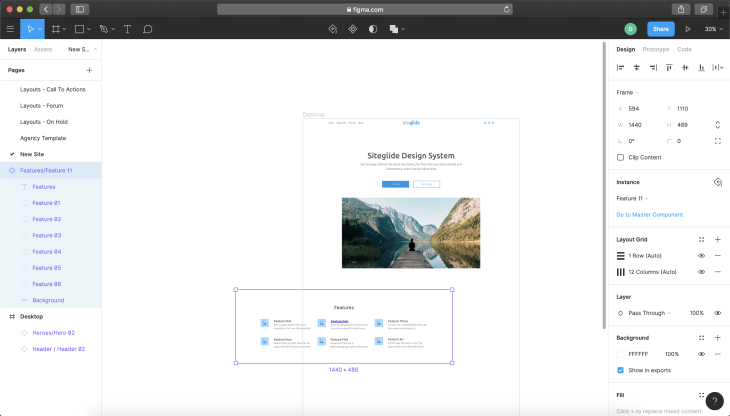
The Siteglide Design System (DS) takes the fundamentals of a standard Design System but integrates it tightly into the front end development process when building websites into Siteglide.
There are 2 elements to the Siteglide Design System:
In Figma (an online design tool similar to Sketch, Photoshop) an agency would take the various modular layouts and piece them together into Page Templates and Page Layouts. The design process with the client can be far more efficient as they can quickly mockup wireframes and clients can comment on and interact during the process.
 Website Security
The PHP2Shell flaws (CVE-2026-109618 and CVE-2026-109619) hit PHP sites hard. Siteglide is built without PHP, so it isn't affected.
Read article → Industry
Part 3 of our AI series: AI capability is doubling fast. How to future-proof your agency by building for the trajectory, not the tools.
Read article →IndustryPart 2 of our AI series: AI will split agencies into those who just work faster and those who build IP. Why only one has a future.
Read article →Every plan includes every feature. Build, test and hand over on staging, then add a domain when the client is ready.